


 Voyager Suite
 Breeze
 Virtuoso
 Investment Suite
 RentCafe
 CommercialCafe Suite
 Elevate Suite
 Procure to Pay Suite
  Energy Suite
 Aspire
 RightSource
 Care Suite
 Matrix
 WorkCafe
 Yardi Kube Suite
 ScreeningWorks Pro
  Yardi Corom



















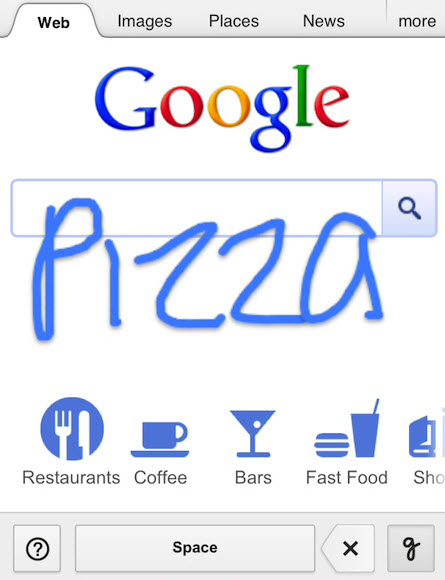
If you have a touchscreen mobile device, Google is adding a third search feature to the usual typing-voice command combo. If you have an iOS5+ device, Android 2.3+ phone, or Android 4.0+ tablet, starting right about now you have the option to hand write search requests directly onto the screen.
Here’s a peek at the new technology in action (WARNING: this video contains upbeat music & whimsical/potentially annoying search scenarios):
Print and cursive writing in 27 languages is currently supported but if your cursive is messy you will probably run into a lot of mistranslated words, hopefully to comedic rather than disastrous effect. The immediate advantages seem pretty obvious:
 It’s faster than typing.
- More accurate than voice command.
- Great for people with big/clumsy fingers prone to double-keying.
- Effective workaround for disabled users who struggle with typing or voice.
- Writing on the screen is more fun.
Activation is simple. From any mobile browser, load the Google home page. Scroll down to the bottom of the screen and tap “Settings” (tablet users, tap the gear icon to open the Settings page). Find the “Handwrite” setting and tap the enable option; scroll to the bottom of the page and tap the blue “Save” button. Now that it is activated, reload the Google home page and the Handwrite icon (a little cursive “g”) will be displayed in the bottom right corner, just tap that to turn the handwriting feature on and off. You may now begin writing.
Go ahead and write on the whole screen, don’t feel like you have to stay within the tiny search box lines. Brief experimentation reveals that drawing little pictures is not yet supported – I drew a feline shape, but was not offered anything even vaguely LOLcats related. Maybe that’s on deck for Google Handwriting 2.0. Auto-complete still works, as potential iterations of what you write will appear typed into the search box; if what you are looking for appears, just go ahead and tap it as usual. Handwrite is automatically disabled on search results (and all other) pages, so you do not have to use the icon to constantly toggle.
Not exactly a killer app of world-changing proportions, but this is a nice alternative in certain circumstances to the time consuming chore of typing, or to the likelihood that your voice command will be misinterpreted. There’s an appealing convenience for real estate applications – writing in addresses while on the go is a lot easier than struggling to type them in on a touchscreen micro-keyboard.
What do you think? Clever little add-on that might prove occasionally useful, game-changing evolution in your mobile search-dominated lifestyle, or just another obscure little feature that you have no desire to use? Let us know what you think.