Voyager Suite
 Breeze
 Virtuoso
 Investment Suite
 RentCafe
 CommercialCafe Suite
 Elevate Suite
 Procure to Pay Suite
 Energy Suite
 Aspire
 RightSource
 Care Suite
 Matrix
 WorkCafe
 Yardi Kube Suite
 ScreeningWorks Pro
 Yardi Corom



Four prompts show what happens when Claude and ChatGPT read your Virtuoso Enterprise data directly: scenario forecasts, budget variances, tenant backup and portfolio trends.
For CRE teams, questions tend to arrive before the reports that answer them. With the Virtuoso Connector available in Yardi Virtuoso Enterprise for Commercial, AI assistants read the lease, ledger and operating data in Yardi directly, so you can ask in plain language and get a fast answer built from your own records.
To demonstrate how the Virtuoso Connector delivers the commercial real estate answers you need, the four examples below pair each prompt with the result it returned, using data from a Yardi demo database. Each prompt names the property or suites, the time frame and the desired output.
Not sure where to start? If you have Virtuoso Enterprise, check out the Yardi Virtuoso ChatGPT plugin and Yardi Virtuoso Claude Connector.
Quick reference: Connector prompts for commercial real estate
| Use case | What to name in the prompt | Ask for |
| Scenario forecasts | The suites, the lease terms for each option and the end year | NOI by year and the cash-basis difference |
| Mid-meeting reports | The property, the line that’s off and the period | Variance by GL account, then vendor and invoice, with a dollar threshold to flag |
| Tenant backup | The suites and the reconciliation year | Every term, the GL accounts behind it and the lease clause it’s based on |
| Trends to watch | Your role, the property and the time frame | The 10 most important trends |
Model “blend & extend,” re-lease & renewal scenarios
Use this if a tenant’s broker proposes a blend and extend six months early, and you need to know whether it beats holding to expiration and re-leasing at market rate.
Example prompt: “Model three scenarios for Suites 250A and 250B through 2030 using their current lease terms and share of this year’s operating expenses: blend and extend at $38 for 7 years; hold, then re-lease at $53 with 9 months downtime and $50/SF TI; hold, then renew at $48 with $15/SF TI. Assume 3% annual steps on each new lease. Show NOI by year and the cash-basis difference.”
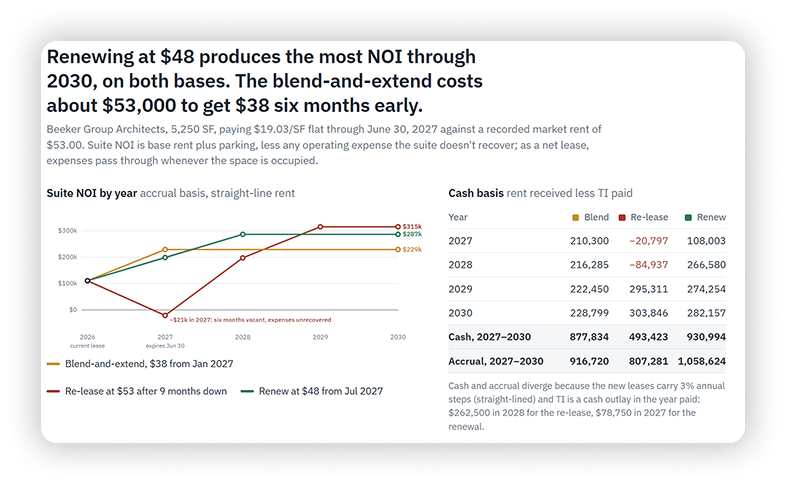
Result: Renewing at $48 produced the most NOI through 2030 on both an accrual and a cash basis. The blend and extend cost about $53,000 in cash compared with renewal. Re-leasing at $53 came in last, held back by nine months of downtime and $50 per square foot in tenant improvements.
Answer budget vs. actuals questions mid-meeting
Imagine you’re presenting budget vs. actuals when a board member asks why repairs and maintenance are over.
Example prompt: “R&M is over budget at Sunrise Tower year to date. Show the variance by GL account, then break the biggest overages out by vendor and invoice. Flag anything over $5,000 and anything that looks like it may belong in a capital account.”
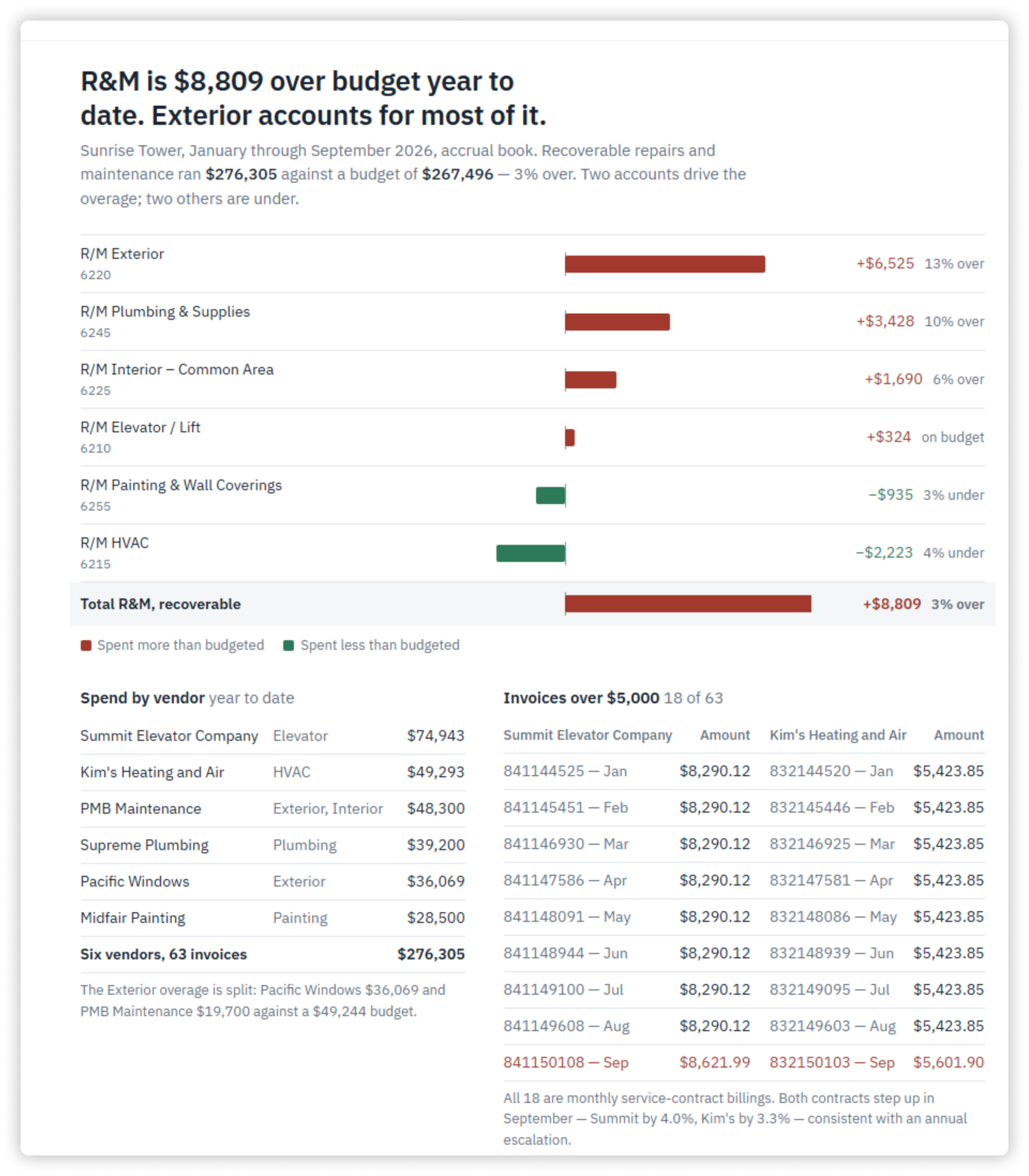
Result: Repairs and maintenance ran $8,809 over budget through September, amounting to about 3%. Exterior repairs drove most of the overage at $6,525, followed by plumbing. HVAC and painting came in under budget.
The AI assistant flagged no invoices as possible capital work. It did note that three service contracts stepped up in September, which may mean the budget was set below contract rates. A follow-up prompt can go further into exterior repairs or those three contracts while the board member is still in the room.
Build common area maintenance reconciliation backup for tenants
Anticipate that common area maintenance (CAM) reconciliations might draw disputes, and they tend to arrive together at year-end.
Example prompt: “For Suites 250A and 250B, show the 2024 CAM reconciliation: pro-rata share, base year stop, every expense in the pool by GL account, the exclusions and caps applied, and the lease clause record each term is based on.”
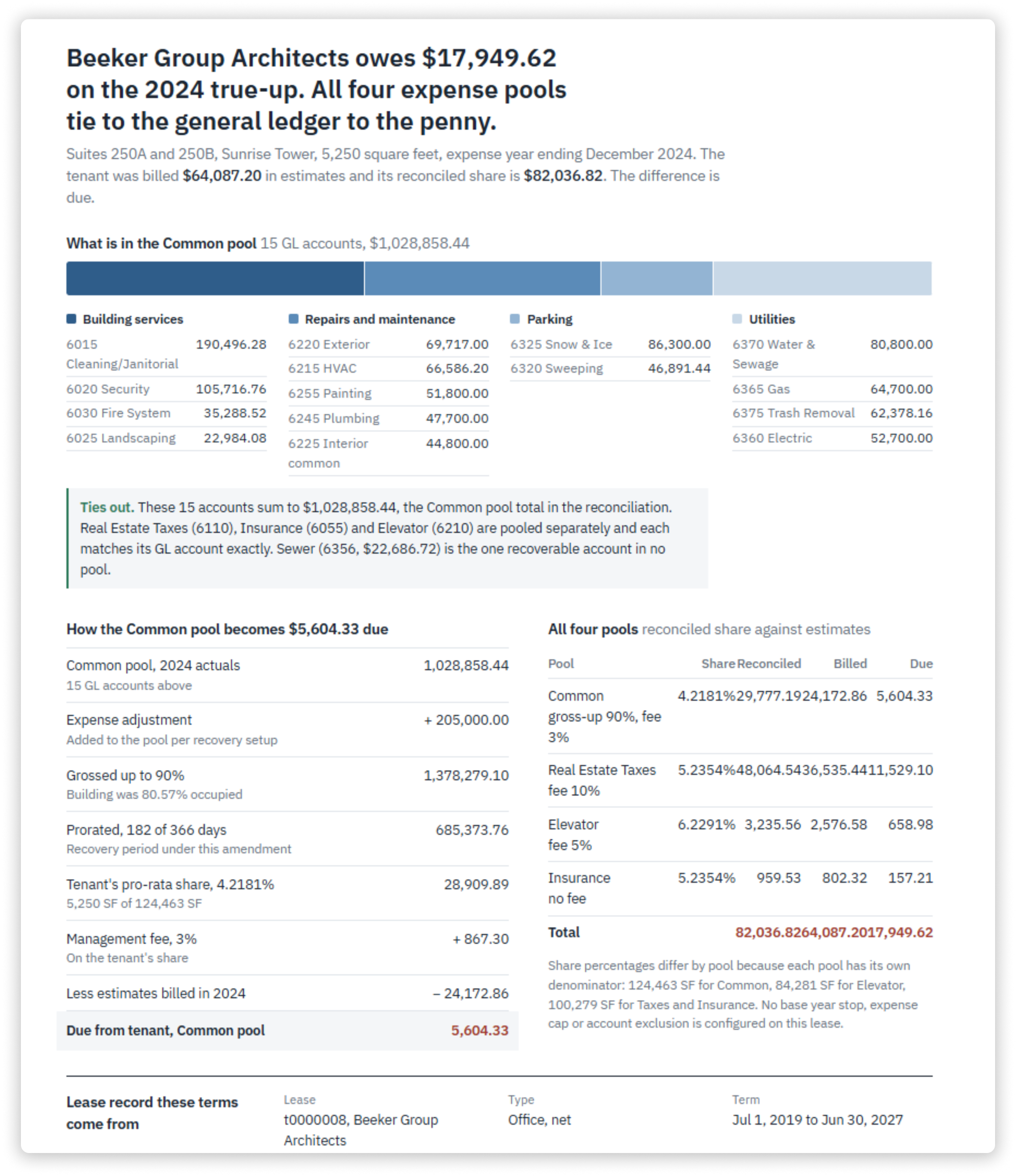
Result: The tenant owes $17,949.62 on its true-up. Every number traces back to the general ledger and the lease record, so the tenant can check the backup line by line. Asking for the lease clause behind each term is what makes the output usable as backup.
Surface portfolio performance trends for next quarter
Sometimes the most useful prompt is the broad one.
Example prompt: “As the property manager of Sunrise Tower, tell me the 10 most important trends I need to focus on in the coming quarter to maximize profitability and avoid risk exposure.”
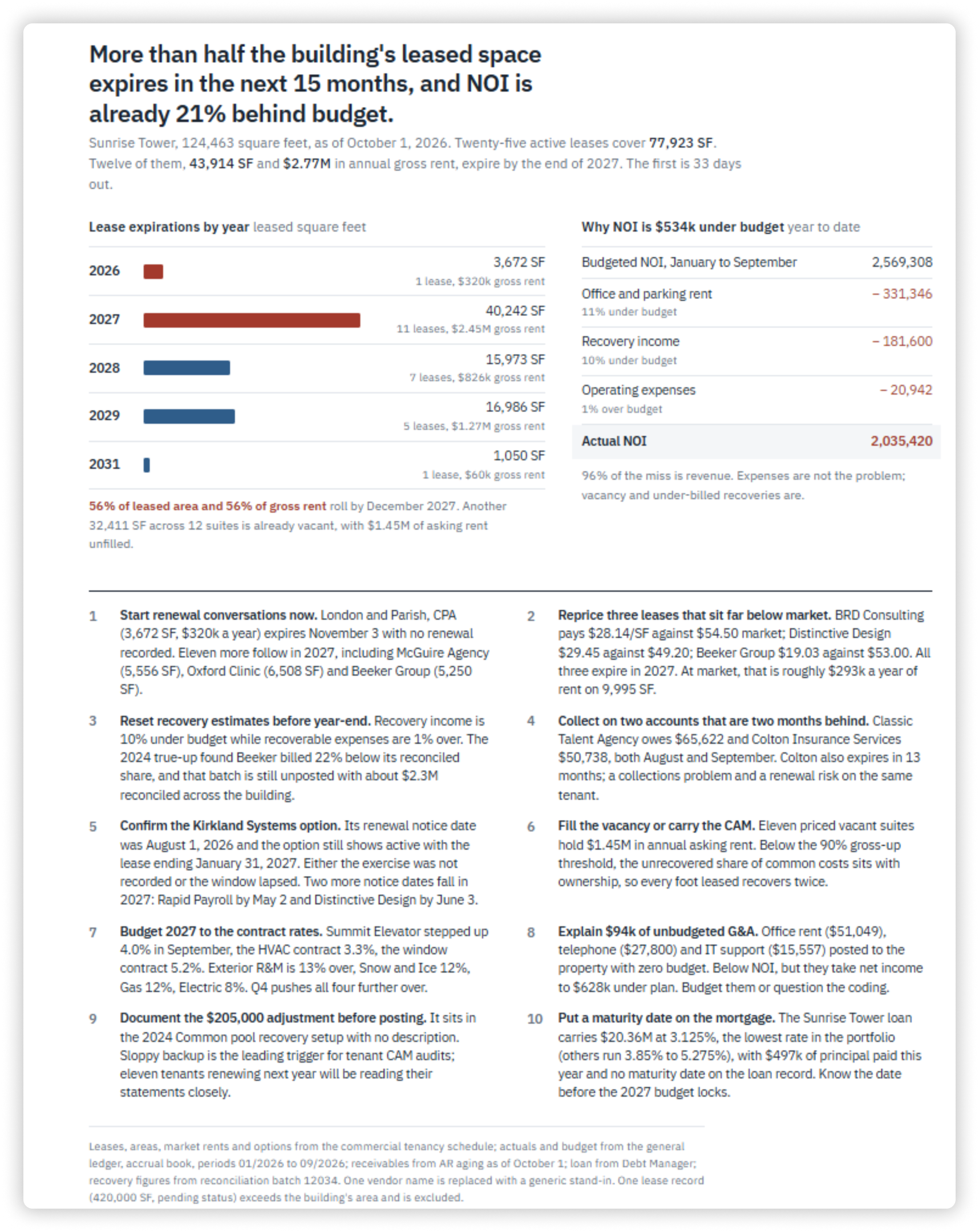
Result: The AI assistant returned 10 trends. NOI ran 21% behind budget and 56% of leased space expires by the end of 2027. You could pick any one and use the prompts above to go further.
What changes when lease & ledger data answer together
Each example crossed a line that usually slows teams down. The scenarios needed lease terms and operating expenses together, and the CAM backup needed the general ledger and the lease clause side by side. The large language models can answer in one step because that data lives in one platform. That shifts the work from assembling numbers to deciding what to do with them, and “I’ll get back to you” becomes a follow-up question in the room. See more starter prompts in our free guide.
Ready to learn more? Request a Virtuoso demo.